Zach SternCommercial lawyer

Work Fleet Orchestrator

Fleet Orchestrator · Agents

Keeping track of a team of AI agents.

With several AI coding agents running at once, it's hard to see who is doing what, and their work can be lost when a session ends. Fleet Orchestrator is the workspace I'm designing to keep each agent's work in one place and show when I need to step in.

Component study · the project's own components with made-up agents · three review-gate tests passed on September 19, 2026

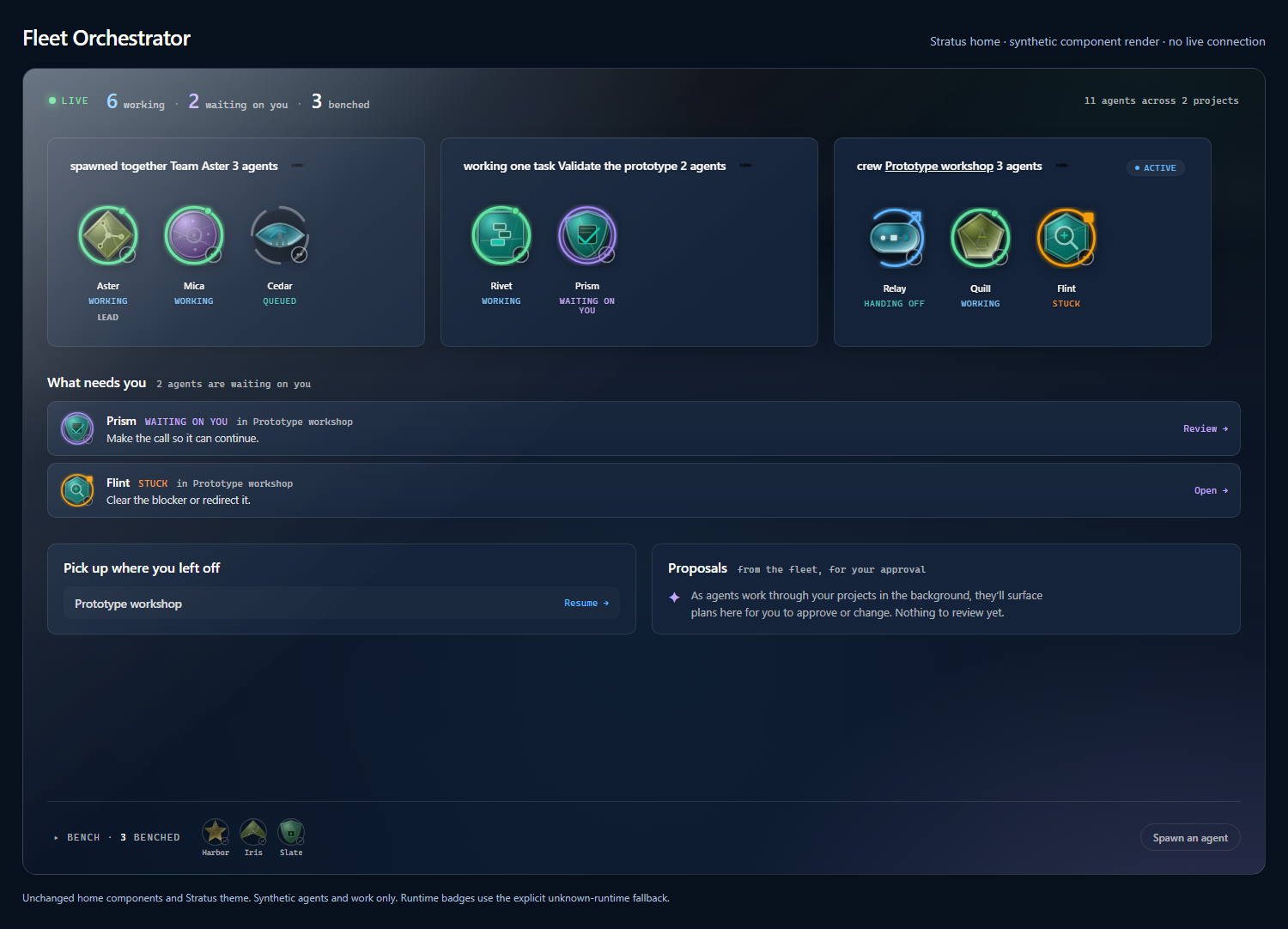
Fleet Orchestrator home screen: made-up agents grouped by team, task and crew, with a list of the two agents waiting on a person
Component study · made-up agents The home screen, drawn by the project's own components. The live light and the counts are sample data.Full size

An agent's work should outlast its session.

Each agent gets its own identity and its own record. A session is one run of that agent. The record is meant to outlast it, so the work can be read somewhere other than a terminal window.

A lasting identity

Each agent keeps a name, a role and an icon that stay the same while its work changes.

One record

Conversation, tasks and reviews sit together in one place instead of across terminal windows.

A list of what needs me

The home screen lists the agents waiting on a decision or stuck, each with the next thing to do.

A gate before work moves on

A serious problem found in review holds the work back until a fix is recorded.

Say a crew, every agent assigned to one project, has three agents. One is at work, a reviewer is waiting on my decision, and the third is blocked. I wanted a screen that makes those differences obvious at a glance, then lets me open the right conversation, the commands that ran, the files that changed and the review record before I step in.

Fleet Orchestrator is the next problem along from Epistemic Skills, which grew out of wanting agents to check whether their changes worked.

An icon for every agent, readable at a glance.

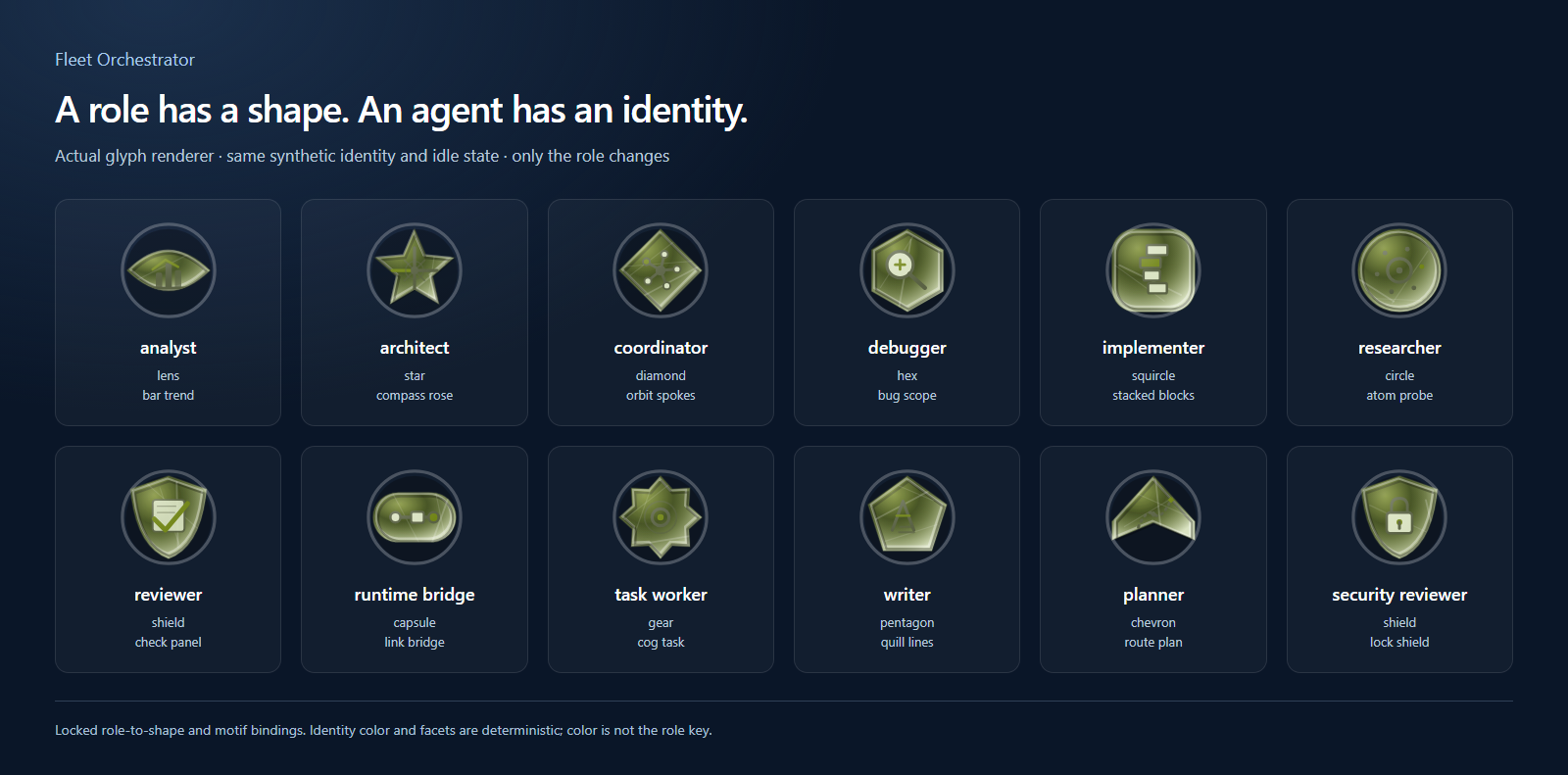
Each agent gets a glyph, an icon that stays recognizable while its work changes. The role sets the shape, and a ring around it shows what the agent is doing.

Twelve Fleet Orchestrator role glyphs with their silhouette and motif labels

Twelve roles from the project's own glyph renderer. The name and idle state stay fixed and only the role changes. The role picks the silhouette and the motif inside it, and also shapes smaller details. Reviewer and security reviewer share a shield with different motifs.

Component study · made-up agentsOpen full-resolution image
Role sets the shape
An implementer carries stacked blocks, a reviewer a check panel, a writer quill lines. Each agent's colors come out the same every time, which helps tell agents apart. Color never marks the role.
Activity changes the ring
Running, review, handoff and blocked each get their own ring. The inside comes from the agent's name, role, family and copy number, never from its state or the tool running it. Text labels carry the meaning too.
Detail grows with size
At 24 pixels a glyph keeps its shape and ring. Larger sizes add the motif, facets and a badge for the tool running the agent. From 96 pixels a copy shows tally marks, and each copy in a family turns 15 degrees further.

Deciding what to do stays separate from doing it.

The Surface Bridge takes a decision about what an agent should do next, turns it into instructions for whichever AI tool is running that agent, and reports back how it went.

  1. CockpitI see and decide

    The screen where I follow the agents and send a command or a message to one of them.

  2. Control planeIt keeps the record

    The central service that holds each agent's identity, its tasks, the rules and the history. Requests reach it through a single entry point.

  3. Surface BridgeIt translates

    It starts the work on the chosen tool through an adapter written for that tool, and sets up the session and workspace.

  4. RuntimeThe tool does the work

    The AI tool running the agent makes the changes in the project's files.

Progress and results travel back the same way, through the bridge to the control plane, which updates the screen and keeps the lasting record. Continuity here means that recorded history plus a summary of context, held in one agreed place. Keeping the deciding apart from the running is what should let an agent outlast any one session.

A simplified map drawn from the project's source code.

When work comes back, the gate decides whether it can move on.

When an agent hands work back, I want to know what it actually finished. In Fleet Orchestrator a reviewer can record a finding: a problem serious enough that the work shouldn't move on. The review gate answers one question, whether this work may proceed, and it refuses an approval that comes with no reason, reference or finding attached. These five steps retrace what the project's own tests check, starting from a sample finding that says a required input check is missing.

A serious problem blocks the work.

The reviewer records a high-severity finding, with a summary and pointers to its evidence. The gate counts one blocker and says no.

Recorded finding

Severity
High
Status
open

↓ The gate is checked

Blocked

Allowed
false
Finding blockers
1

The test checks both the blocked answer and the single blocker.

Routing it back doesn't count as fixing it.

The finding is sent back to be fixed. That hand-off is recorded, but the finding stays open and the gate stays shut.

Keeping the finding open lets the history show that a fix was asked for, and why the work is still held back.

After routing

Finding status
open
Keeps in review
true

↓ The gate is checked again

Still blocked

Blocked
true

The work stays in review until the finding itself changes.

A recorded fix unblocks it.

The test marks the finding fixed and checks three things: the new status, the time of the fix and an entry recording the change. With no open finding left, the gate lets the work proceed.

Marking a finding fixed only updates the record.

Updated finding

Status
fixed
Finding blockers
0

↓ The gate is checked again

Eligible

Allowed
true
Blocked
false

Eligible to proceed is a different thing from complete.

Waiting on a person still allows it.

The next check records the final verification as ready_for_operator, meaning it waits for a person to decide. The gate keeps saying yes and returns that status beside its answer.

Because the answer and the reason come back separately, whoever reads the result can tell an open problem, a pending decision and a failed check apart.

Verification record

Status
ready_for_operator

↓ Nothing in the record blocks the gate

Eligible

Allowed
true

The gate still says yes. That doesn't mean the check passed.

A failed check blocks it again.

The test records the verification as passed, then changes it to failed. The gate blocks again and reports the failure.

An earlier yes can't stand in for a later check, because the gate works out its answer from the current records every time.

Later verification record

Status
failed

↓ The changed record is checked

Blocked again

Blocked
true
Verification
failed

Three choices behind the gate.

Routing isn't fixing
Sending a finding back is recorded, and the finding stays open until a fix is recorded.
Reasons beside the answer
The gate returns why next to its yes or no, so a pending decision and a failed check read differently.
A finding belongs to its task
An update sent through another task's address is refused and leaves the finding untouched. The same update through the finding's own task succeeds.

What went into this work.

What I did

I decide what each project is for and check what comes back. Here, I wanted to see who is doing what, what changed and where I need to step in. I worked out the icon and home-screen designs with the AI tools.

What the AI did

AI tools write the code, including the three tests on this page.

How I work with AI tools

What ran, and what's still open.

Recorded
Three of the project's own tests passed on September 19, 2026, with no failures or skips. They ran the project's real code against sample data.
Source
Private. The icons and home screen come from the project's own components with made-up agents. A summary of the tests is public as JSON.
Not shown yet
The product in use. Nothing here shows a real agent at work, a real database, data surviving a restart, a deployment, or how easily the state rings read at small sizes.
The full record: what the tests checked and what they leave open

What the three tests checked

StageWhat the test saw
Review requestOne reviewer and an inbox for it are set up.
Inbox read twiceThe second read doesn't log the same message as received again.
Bare approvalAn approval with no reason, reference or finding is refused (HTTP 400).
Open high-severity findingBlocked, not allowed, one finding blocker.
Finding routed for a fixStill blocked; the finding stays open and in review.
Finding marked fixedStatus fixed, fix time and change event recorded; allowed, no blockers.
Waiting on a personAllowed, with verification status ready_for_operator.
Verification passed, then failedBlocked again, with verification status failed.
Update through the wrong taskRefused as not found (HTTP 404); the finding stays open.
Update through its own taskSucceeds, which shows the update works when the task matches.

What they leave open

  • "Allowed" means no blocking finding and no blocked or failed verification. It isn't task completion or proof that the work is correct.
  • The five steps above combine checks from three separate tests. They aren't one captured session.
  • No production database, real agent session, AI provider, outside task write or deployment was exercised. Nothing shows a task finishing outside the test.
  • The task check covers the link between a finding and its task in sample data. It doesn't test a real login.
  • The rule against bare approvals checks that a reason, reference or finding is attached. It can't judge whether that evidence is true or any good.
  • Only open high or critical findings block the gate. A separate, optional check for what the project calls candidate findings is off by default and wasn't run.
  • Routing records an event. It doesn't carry out a fix or show that an agent made one.
  • The icons and home screen were captured with the project's local setup and a system font, the fallback its own code names. They don't show a production build or full accessibility. The enlarged state rings don't show how easy they are to tell apart at small sizes, or how they move.
  • The Surface Bridge map comes from reading the source, not from watching it run. An adapter written for a tool doesn't mean that tool is available or works as well as the others, and a reachable endpoint doesn't prove useful work.
  • Continuity is a recorded history and a summary of context. It doesn't promise to carry over a model's internal state.
  • The public summary lists selected checks. The application source and the full private test record aren't published.

Where the record comes from

The tests ran on September 19, 2026 at 18:54 UTC, in a checkout whose files match commit 169177603e18 on the private repository's main branch; the three test files match it by SHA-256. The icons, home screen and design notes come from the same commit. On September 22 and 23, 2026, the summary gained more checks read from the same tests' source and the commit it ran against. No tests were rerun.
Next projectNeuraxic
All work
Component study · made-up agents